
Boss Man Jobs is the all-in-one app that gives contractors, tradespeople, and field crews the tools to manage jobs, track time, send invoices, build estimates, and communicate with clients — all from your phone.
Built by a contractor. Not by a company that hired one.
Built for iPhone, iPad & Mac. Crew on Android? Every employee gets the free web Team Portal — schedules, time cards, clock-ins & team chat on any phone.
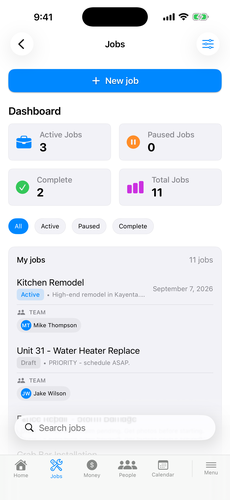
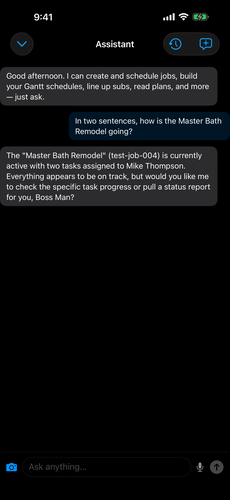
From the first estimate to the final invoice, Boss Man Jobs handles every part of running your contracting business.
Create and track unlimited jobs with tasks, photos, materials, and GPS locations. Assign crew and monitor progress in real time.
Clock in/out with GPS verification. Auto-clock geofencing starts the timer when crew arrives on site. Approve time cards with one tap.
Generate professional invoices with line items and tax, then send them as a clean PDF by email or text. Track paid, unpaid, and overdue invoices at a glance.
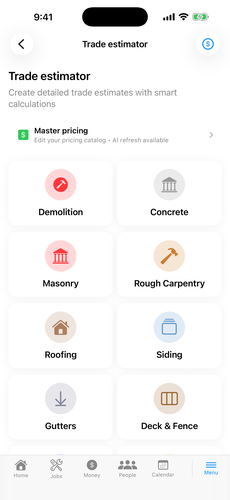
Trade-specific estimators for 20 trades build the line items on your prices, with a master pricing list underneath and AI that can adjust your numbers toward your local market. It gets you about 85% of the way. The last 15% is you.
Walk a room, or the whole house, with your iPhone and get the measurements, door and window detection, a blueprint PDF, and a materials takeoff — drywall, mud, paint, baseboard, trim, flooring, square footage of walls, floors, and ceilings — that drops straight into the estimator. Scan a repair and get an estimate for it. Every scan is saved. Requires an iPhone with LiDAR (Pro models).
Manage your crew with work orders — including recurring maintenance and signed completion receipts — daily assignments, and a drag-and-drop schedule builder.
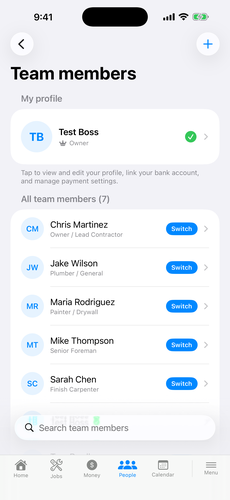
Built-in messaging for your crew. Direct messages and a team-wide channel, all inside the app — no group text mixed in with family.
Get help with scheduling, writing proposals, answering trade questions, and analyzing your business data. Built in on Pro — no API key needed. It reads your job site plans and flags conflicts before they're framed in, and it lays out your day across every job with daily reminders.
Money in and money out. Invoices, estimates, payments received. Pay your crew and keep the payout history — unpaid hours per period or per job, mileage and gas included. Expenses, your overhead number, and a tax center with your tax documents. Full payroll: coming soon.
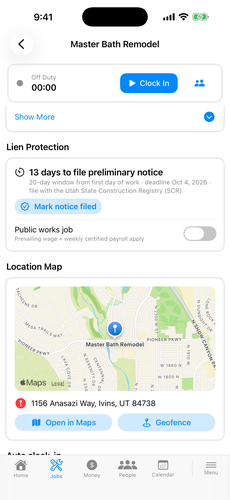
Real-time team location tracking. Set geofences around job sites for automatic clock-in/out. Location-verified time entries. Location shows while someone is on the clock and stops at clock-out. It tracks the clock, not the person.
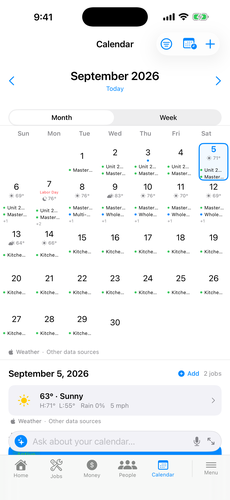
See all your jobs, meetings, and deadlines on one calendar. Weather forecasts and safety alerts help you plan around the elements.
Track materials, tools, and equipment. Send materials to job sites, assign assets to crew members, and never lose track of your gear.
Send professional estimates and let clients sign — in person on your screen, or from their Client Portal. The estimate is marked accepted, the PDF prints the signature, and you can convert it to a job or an invoice in one tap.
Build critical-path Gantt schedules for any job or standalone. Link trades, set durations and dependencies, and save reusable templates for the way you work. Attach your subcontractors to the schedule and the app reaches out to queue them up when their part is ready — and re-queues them when the schedule slips.
Document every scope change with line items, in-app client sign-off, and a sendable PDF — so extra work is approved and on the record before it starts.
Attach job plans as PDFs, mark them up with Apple Pencil or a finger, and build punch lists right on the drawings — all synced to the job.
Point the phone at the job and talk. The AI sees through your camera and measures through the LiDAR sensor, so it knows the size of what you're looking at — ask how wide the opening is or how many sheets the room takes, hands-free. Few apps have anything like it.
Boss Man Jobs runs as a native desktop app on your Mac — with a sidebar layout, keyboard shortcuts, and multi-window support for the big screen.
Plain guidance on licensing, taxes, liens and legal, payroll, labor, and insurance, plus notifications when a lien filing or another deadline is coming due. Guidance and reminders, not legal advice.
Certificates of insurance, licenses, and every job document, for you, your employees, your subcontractors, and your vendors, on the record where you'd expect it, with alerts 30 days, 7 days and the day before your own licenses, insurance and certificates expire.
Ten analytics reports from live data over any date range: job profitability, revenue summary, expense summary, time tracking, client revenue, employee productivity, tax summary, material usage, invoice aging, and estimate conversion. Pick one, set the range, save or share.
Daily reports, field reports, and an issues report with photos and a list of what's wrong — all dated and attached to the job, so the record exists before anyone disputes it.
A level in your pocket, job-site weather, a unit converter, and calculators for concrete, framing, roofing, stairs, drywall, paint, flooring, masonry, and excavation.
Every job holds its photos and video, and a panorama section holds the wide shots of the whole site — the showcase shot for clients.
SMS and email templates for the messages you send every week — the two-day appointment reminder, the day-of confirmation, job complete, and review and referral requests — with the client's name, job, date, and address filled in for you.
Money management advice, business tips, and contractor knowledge, plus a bills breakdown calculator for your employees. Advice, not accounting.
Your business and social contacts behind a scannable QR code. Face ID lock and passcodes. A home screen, job screen, and toolbar you arrange yourself.
Boss Man Jobs puts your entire business in your hand. Jobs, invoices, time tracking, estimates — tap, done.
Start Free Trial
Every feature is built for the way contractors actually work — on the job site, in the truck, or wherever the day takes you.
Whether you're a one-person operation or managing multiple crews, Boss Man Jobs scales with your business.
You're the boss, the crew, and the office. Get a professional system to track jobs, bill clients, and manage your time — without the complexity.
Keep your team on the same page with team chat, shared schedules, work orders, and real-time location tracking.
Multiple crews, multiple sites — Enterprise includes 15 seats with no cap on team size and a higher AI allowance.
No training manuals. No IT department. Just download and go.
Download free from the App Store and set up your business profile in minutes. Every new account starts with a 30-day free trial of every Pro feature — no payment required.
Send invite codes to your team members. They join your network instantly and get access to their schedule, time tracking, and chat.
Create your first job, clock in, send an invoice. Boss Man Jobs works the way you work — fast, mobile, and no-nonsense.
From the AI assistant to time tracking to the smart estimator — here's what Boss Man Jobs actually looks like.
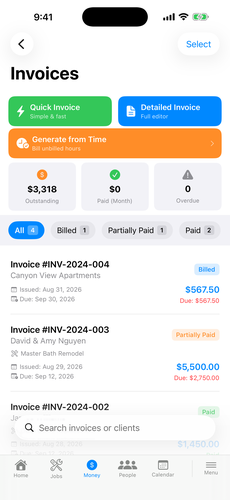
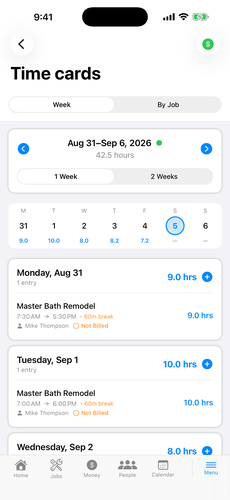
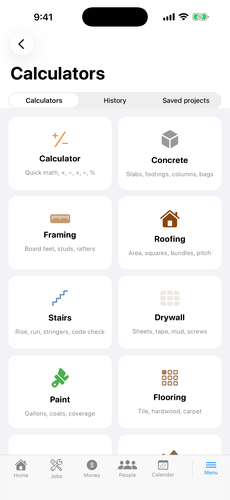
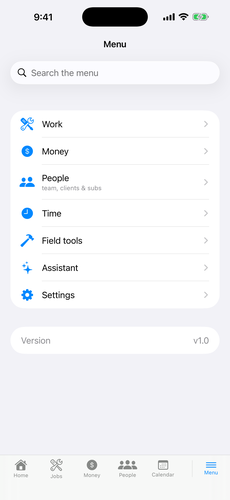
Twenty trade-specific estimators, each with the inputs that trade actually uses, on a master pricing list you control. Enter the job, get the line items, change anything, send the PDF. The estimator gets you about 85% of the way; the last 15% is your rates, your market, your judgment. That’s on purpose.
Using your iPhone’s LiDAR sensor, Site Vision scans a room or a whole house in 3D, pulls the measurements, detects doors and windows, generates a blueprint PDF, and builds a materials takeoff that drops into the estimator. Scan a repair and get an estimate for it. Requires an iPhone with LiDAR (Pro models).
The scan gets you the takeoff. You finish it — check the numbers against the job before you order, and measure before you cut.
Measure twice. Tap once.

Invoices, estimates, crew tracking, an AI that walks the job with you — everything you need to run the job site, right from your pocket.
The app does the work. You make the call.
See All Features


On the job site. At the beach. In the truck. As long as you have your phone, your business is running — invoices sent, crew tracked, jobs managed.
Start Free TrialBoss Man Jobs goes where you go. Here's how the boss gets it done.
But when he does, the job still gets done.
Stay on the job. Even when you’re not on the job.


Inspectors iron their shirts for him. Permits pull themselves. He runs jobs from anywhere.
The Biggest Boss Man in the World. Light blue suit. Tropical drink. Brick phone. Jobs handled.
For contractors who've earned the umbrella.
Your contractor sends you a unique link — just tap it to access your portal. No app download, no account needed.
Got a portal link from your contractor or boss? Enter it below.
Links look like: bossmanjobs.com/c/abc123 (client) or bossmanjobs.com/t/abc123 (team)
Every client gets a unique link to their own portal — invoices, project documents, and direct messaging. Branded with your business name.
Crew members access schedules, work orders, time tracking, and team messages from any browser — even without the app installed. Works great for sharing job information with employees who don't have an iPhone.
No hidden fees. No contracts. Cancel anytime. Crew members never pay.
How we compare
Boss Man Jobs Pro covers 5 users and includes team chat, real-time location, the AI assistant, and the smart estimator. Competitor prices are their published monthly rates as of September 2026 and may change.
Boss Man Jobs was built by a contractor, for contractors. It started as the app he needed to run his own company — every feature designed from real job site experience. Then he decided to put it on the market so every contractor could have the same tools. One app. Every tool.
Free download. First month free.
Free 30-day Pro trial. No credit card required. Crew members always join free.
Short, narrated walkthroughs of the app — recorded screen by screen. Start at the top and you'll have your first client, job, and invoice done by video three.
Everything in the app hangs off a client. Add one, fill in their details, and find them again with search.
Build a job, link it to a client, set the site address, assign your crew, and see it land on the board.
Three ways to bill, a quick invoice from start to finish, and the clean PDF your client actually sees.
Drop time blocks on the crew timeline, assign them to a job, and check the day view before you roll out.
Month and week views, colour-coded job status, daily detail, and filters for one worker or one job.
Clock in and out on a job, see who's on the clock right now, and where the hours land afterwards.
The Gantt view for multi-trade jobs, and the outbox that writes every sub's booking message for you.
Attach a plan set to the job, pinch to zoom around it, and mark it up right on your phone.
Drop numbered pins exactly where the problem is, describe the fix, and work the list to done.
Your money in one place — and the crew payout screen that totals everyone's unpaid hours for the week.
Ten analytics reports. Pick one, set the date range, and it builds from your live data — ready to save or share.
A level, site scanning, a trade estimator, job-site weather — and calculators that size a concrete pour down to the bag.
One free download covers iPhone, iPad, and Mac — the same account, the same jobs, on every screen you work from. Every new account starts with a 30-day free trial of every Pro feature. No payment to start, and your crew always joins free with your invite code.
Available for iPhone and iPad, with a native Mac app (Apple silicon) from the same listing. After your free month: plans from $29/mo — employees never pay.
Crew on Android or any other phone? Every employee gets the free web Team Portal — schedules, work orders, time clock, and team chat in any browser. No app required.